 Image 1 of 1
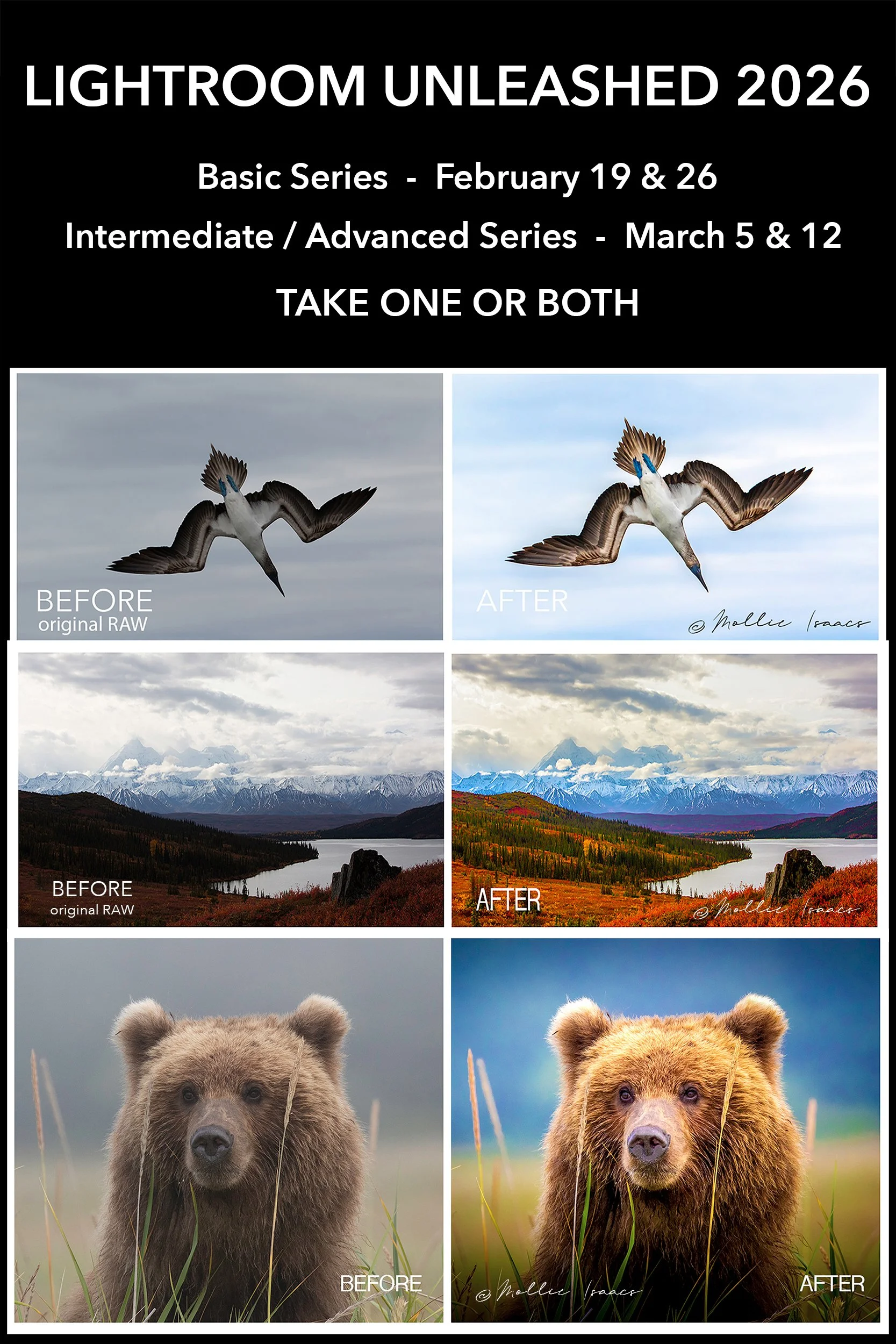
LIGHTROOM UNLEASHED 2026 - Two separate courses in February & March, BASIC and INTERMEDIATE / ADVANCED. Take either one or take both for a reduced rate.
SPECIAL RATE OF $1125 FOR BOTH SERIES COMBINED
Payment of $625 will reserve your spot.
Those taking both Series will be billed for the balance in January.
Learn the fastest, easiest, most foolproof ways to use Lightroom Classic in this live, interactive, online webinar series. This is not the standard, boring, complicated Lightroom instruction. It is personalized with a clear, concise, easy-to-understand approach. AND it is live and interactive! Plus, a personal one-on-one email exchange with me is included at no charge at the end of each course to address your specific issues or questions.
All sessions will be video recorded and you will be able to view them for up to one year.
_______________________________________________________________
There are two course options – the Basic Series, and the Intermediate / Advanced Series. You can opt for either one, or both together (special reduced rate if you take both).
BASIC Series – Choose this if you have never or rarely used Lightroom Classic, OR if you have tried it but find it confusing or are unhappy with your results. The Basic Series is a 2-session webinar, scheduled one week apart, with each session running approximately 90 minutes.
INTERMEDIATE / ADVANCED Series – This is for you if you already have a good basic understanding of how Lightroom Classic works, know how to properly import images into Lightroom, and successfully use the basic tools and sliders. The Intermediate / Advanced Series is a 2-session webinar, scheduled one week apart, with each session running approximately 90 minutes.
For many people, taking both the Basic and the Intermediate / Advanced is the best approach. If you are unsure, please contact me and I can help you decide.
________________________________________________________________
WHAT OTHERS HAVE SAID:
“Mollie’s Lightroom workshop is a game changer. Prior to taking her workshop I was just stumbling through LR and was in an editing rut. Now I have a thorough understanding of all that LR has to offer. And better yet, my images have improved tenfold. I am thrilled with how I can edit my photos and with the successes that I have had in competition. You will not regret taking this course! “ --JA
“Lightroom Unleashed” was super. Great combination of technical expertise, esthetic vision, and communications skills. You’re a very good teacher.” – NS
“I was so impressed. I am a novice to digital processing and I very much appreciated your streamlined approach to using Lightroom and above all, your excellent presentation skills. Everything was crystal clear.” – MG
“Magnificent presentation! I already have 3 books, plus manuals, and two videos on how to use LR. However, I probably learned MORE from your presentation than all of them combined! The big difference was that you explained it so clearly and in common-sense terms.” – LP
“I thoroughly enjoyed your presentation! Although I have tried Lightroom in the past, I never really got the hang of it...until your presentation.” – GP
“I have watched several different people doing LR webinars and must say that you are ahead of the pack. I loved the calm pacing, and how you explained your reasoning.” –LH
_______________________________________________________________
What does the Basic Series cover?
my comprehensive yet simple methods of using Lightroom Classic successfully with no fear or confusion
simple and successful processing and workflow for each and every image
how to use all the basic tools and adjustments to make your images the best they can be, AND which tools to avoid
how the Lightroom Catalog works, and not be confused or afraid of it (you won’t have to change your current image storage or filing system at all!)
the best and most foolproof way to import images
how best to use the Masking tools
best methods for image editing
best ways to rate your images
best ways to back up your images
and more!
All sessions will be video recorded and you will be able to view them for up to one year.
PLUS the course includes one free 30 minute follow-up personalized email exchange to answer your questions or to review problem images. [Additional personal emails, or personal Zoom meetings are also available. Additional fees will apply.]
What does the Intermediate / Advanced Series cover?
a deeper dive into the Masking tools and how to control them
how to use Color Mixer / Point Color / Color Grading
black & white conversions
create an infrared look easily with no special equipment or camera modifications
safely move images within Lightroom Classic without breaking the links
what it means when you see question marks next to images
how to use the Transform Panel
understanding the Dehaze slider and how to tame it
understanding the Texture slider
how to export images
how best to backup your Lightroom Catalog
understanding Chromatic Aberration and how to control it
keywording
batch processing
import smartphone images
important pro tips
All sessions will be video recorded and you will be able to view them for up to one year.
PLUS the course includes one free 30 minute follow-up personalized email exchange to answer your questions or to review problem images. [Additional personal emails, or personal Zoom meetings are also available. Additional fees will apply.]
______________________________________________________________
WHEN:
BASIC Series (2 sessions), February 19 and 26, 7:00 PM Eastern Time.
INTERMEDIATE / ADVANCED Series (2 sessions), March 5 and 12, 7:00 PM Eastern Time.
Each Series includes one free 30 minute follow-up personalized email exchange to answer your questions or to review problem images. Additional personal emails, or personal Zoom meetings are also available. Additional fees will apply.
FEE:
BASIC Series $625
INTERMEDIATE / ADVANCED Series $625
BOTH SERIES COMBINED Special discounted rate of $1125
______________________________________________________________
PREREQUISITES:
1. Must have Lightroom Classic software already loaded onto your computer. Any version from 13 or newer is best.
2. In the Lightroom Classic DEVELOP MODULE, be sure the following Panels in the right-hand column are open: (Tip – if you cannot see either or both of the side columns, click the TAB key on your keyboard to reveal them.)
- Histogram
- Basic
- Color Mixer
- Detail
(All other Panels can remain closed unless you prefer that they be open.)
SPECIAL RATE OF $1125 FOR BOTH SERIES COMBINED
Payment of $625 will reserve your spot.
Those taking both Series will be billed for the balance in January.
Learn the fastest, easiest, most foolproof ways to use Lightroom Classic in this live, interactive, online webinar series. This is not the standard, boring, complicated Lightroom instruction. It is personalized with a clear, concise, easy-to-understand approach. AND it is live and interactive! Plus, a personal one-on-one email exchange with me is included at no charge at the end of each course to address your specific issues or questions.
All sessions will be video recorded and you will be able to view them for up to one year.
_______________________________________________________________
There are two course options – the Basic Series, and the Intermediate / Advanced Series. You can opt for either one, or both together (special reduced rate if you take both).
BASIC Series – Choose this if you have never or rarely used Lightroom Classic, OR if you have tried it but find it confusing or are unhappy with your results. The Basic Series is a 2-session webinar, scheduled one week apart, with each session running approximately 90 minutes.
INTERMEDIATE / ADVANCED Series – This is for you if you already have a good basic understanding of how Lightroom Classic works, know how to properly import images into Lightroom, and successfully use the basic tools and sliders. The Intermediate / Advanced Series is a 2-session webinar, scheduled one week apart, with each session running approximately 90 minutes.
For many people, taking both the Basic and the Intermediate / Advanced is the best approach. If you are unsure, please contact me and I can help you decide.
________________________________________________________________
WHAT OTHERS HAVE SAID:
“Mollie’s Lightroom workshop is a game changer. Prior to taking her workshop I was just stumbling through LR and was in an editing rut. Now I have a thorough understanding of all that LR has to offer. And better yet, my images have improved tenfold. I am thrilled with how I can edit my photos and with the successes that I have had in competition. You will not regret taking this course! “ --JA
“Lightroom Unleashed” was super. Great combination of technical expertise, esthetic vision, and communications skills. You’re a very good teacher.” – NS
“I was so impressed. I am a novice to digital processing and I very much appreciated your streamlined approach to using Lightroom and above all, your excellent presentation skills. Everything was crystal clear.” – MG
“Magnificent presentation! I already have 3 books, plus manuals, and two videos on how to use LR. However, I probably learned MORE from your presentation than all of them combined! The big difference was that you explained it so clearly and in common-sense terms.” – LP
“I thoroughly enjoyed your presentation! Although I have tried Lightroom in the past, I never really got the hang of it...until your presentation.” – GP
“I have watched several different people doing LR webinars and must say that you are ahead of the pack. I loved the calm pacing, and how you explained your reasoning.” –LH
_______________________________________________________________
What does the Basic Series cover?
my comprehensive yet simple methods of using Lightroom Classic successfully with no fear or confusion
simple and successful processing and workflow for each and every image
how to use all the basic tools and adjustments to make your images the best they can be, AND which tools to avoid
how the Lightroom Catalog works, and not be confused or afraid of it (you won’t have to change your current image storage or filing system at all!)
the best and most foolproof way to import images
how best to use the Masking tools
best methods for image editing
best ways to rate your images
best ways to back up your images
and more!
All sessions will be video recorded and you will be able to view them for up to one year.
PLUS the course includes one free 30 minute follow-up personalized email exchange to answer your questions or to review problem images. [Additional personal emails, or personal Zoom meetings are also available. Additional fees will apply.]
What does the Intermediate / Advanced Series cover?
a deeper dive into the Masking tools and how to control them
how to use Color Mixer / Point Color / Color Grading
black & white conversions
create an infrared look easily with no special equipment or camera modifications
safely move images within Lightroom Classic without breaking the links
what it means when you see question marks next to images
how to use the Transform Panel
understanding the Dehaze slider and how to tame it
understanding the Texture slider
how to export images
how best to backup your Lightroom Catalog
understanding Chromatic Aberration and how to control it
keywording
batch processing
import smartphone images
important pro tips
All sessions will be video recorded and you will be able to view them for up to one year.
PLUS the course includes one free 30 minute follow-up personalized email exchange to answer your questions or to review problem images. [Additional personal emails, or personal Zoom meetings are also available. Additional fees will apply.]
______________________________________________________________
WHEN:
BASIC Series (2 sessions), February 19 and 26, 7:00 PM Eastern Time.
INTERMEDIATE / ADVANCED Series (2 sessions), March 5 and 12, 7:00 PM Eastern Time.
Each Series includes one free 30 minute follow-up personalized email exchange to answer your questions or to review problem images. Additional personal emails, or personal Zoom meetings are also available. Additional fees will apply.
FEE:
BASIC Series $625
INTERMEDIATE / ADVANCED Series $625
BOTH SERIES COMBINED Special discounted rate of $1125
______________________________________________________________
PREREQUISITES:
1. Must have Lightroom Classic software already loaded onto your computer. Any version from 13 or newer is best.
2. In the Lightroom Classic DEVELOP MODULE, be sure the following Panels in the right-hand column are open: (Tip – if you cannot see either or both of the side columns, click the TAB key on your keyboard to reveal them.)
- Histogram
- Basic
- Color Mixer
- Detail
(All other Panels can remain closed unless you prefer that they be open.)