 Image 1 of 1
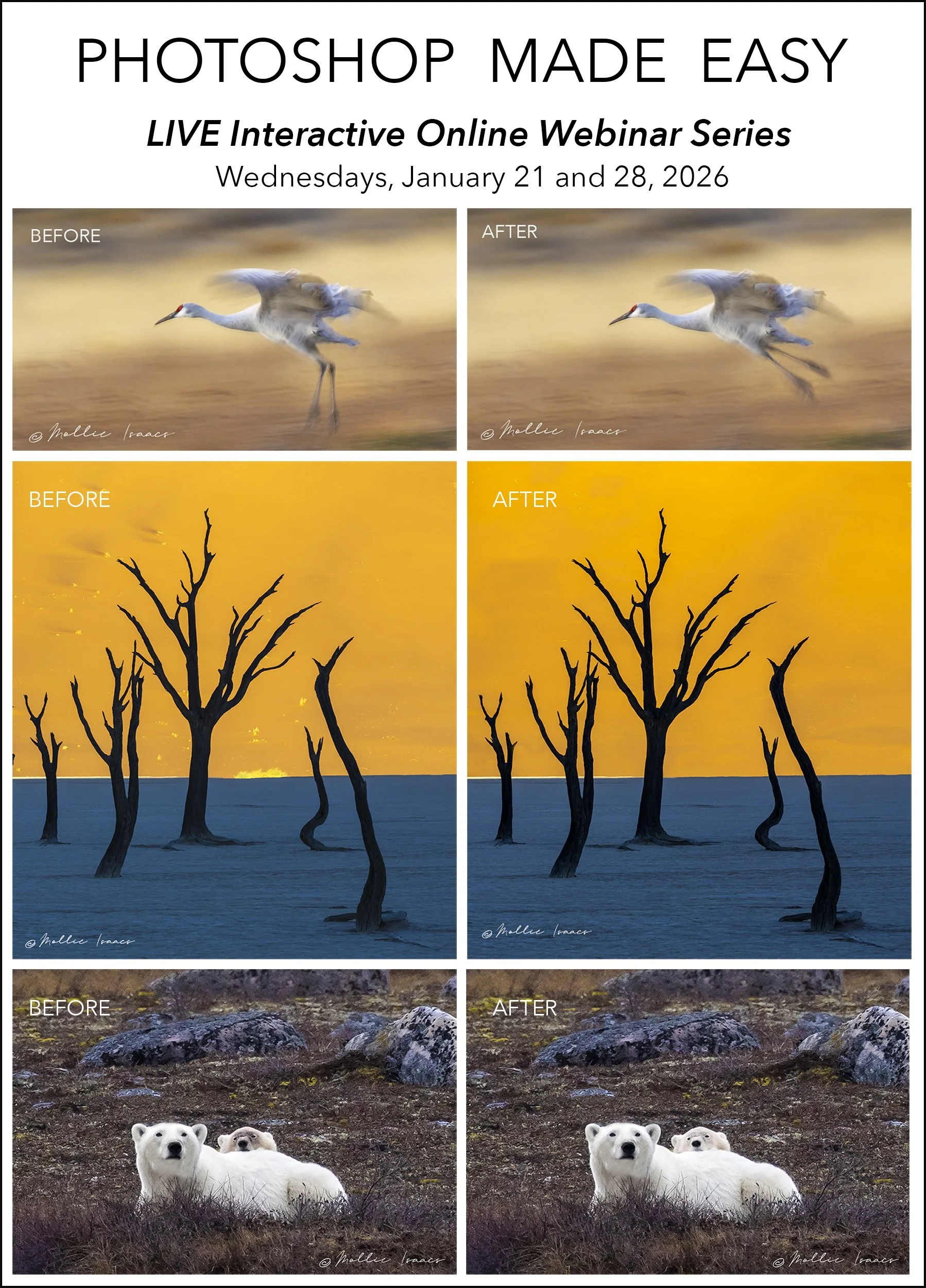
PHOTOSHOP MADE EASY!! 2-Part LIVE online webinar series, Wednesdays, January 21 and 28, 2026 at 7:00PM Eastern Time
JUST ANNOUNCED! Ground-breaking LIVE ONLINE Photoshop webinar series goes far beyond any other training available!
Want to use Photoshop for the things Lightroom can’t do, but find it intimidating? Don’t want to spend a ton of time learning all the ins and outs of Photoshop? Is it all just too scary or frustrating? Have you tried using Photoshop (or Elements) but are not achieving the results you want?
Well, there is hope! Learn ONLY what you need to, quickly and easily with my LIVE interactive online training webinars. This two-part Photoshop Series will dramatically reduce your time needed to learn Photoshop properly, and get you up to speed very quickly!
Sound too good to be true? Read on!
Some time ago I realized that I could use Photoshop successfully (in conjunction with Lightroom) by learning ONLY the parts of it that helped me accomplish what I wanted. No need to learn or understand all of it!
In truth, photographers need to use only a very small portion of Photoshop. Why? Because much of Photoshop is designed for graphic designers and digital artists, and only a small portion of it is useful to photographers. So why learn all aspects of Photoshop when you may never need to use them? I use Lightroom for most of the heavy lifting, and then take images into Photoshop to do any necessary fine-tuning like removing or changing major elements that Lightroom can’t handle.
If you have a basic working knowledge of Lightroom (or other similar software), you can use Photoshop to take your images to a much higher level easily and quickly!
THIS WEBINAR SERIES IS FOR YOU IF:
You already have a basic working knowledge of Lightroom (or other similar software).
You want to know how to make Photoshop the perfect add-on to Lightroom.
You understand that this is NOT a basic training course in Photoshop because as I said, you DON’T need to know it all. But even a novice can successfully learn to use Photoshop for ONLY what they need.
You want to unleash your creativity and take your images to a much higher level.
WHAT THIS WEBINAR SERIES COVERS:
Use and understand Layers in Photoshop easily and quickly, PLUS how to save them in Lightroom and go back to them in Photoshop anytime you wish
Enhance specific areas of images that Lightroom cannot handle
How to work with Brushes in Photoshop
How to creatively use Levels in Photoshop
Learn the little-known magic of using Photoshop in conjunction with Lightroom to “double process” images for more control over modifications, and better results
Learn how to create Digital Mats to give your images a more artistic look
Learn how to use the most important Tools in Photoshop
And more!
NOT SURE THIS WEBINAR SERIES IS FOR YOU? Then join me at a FREE online webinar for a Sneak Peek that will reveal some of what the classes will cover. This FREE Sneak Peak webinar (with no obligation) will be on Wednesday, January 14, 2026, at 7PM Eastern Time. Use this link to attend the FREE Sneak Peak https://register.gotowebinar.com/register/2772696098821469786
WHEN: The 2-Part webinar series will be held on Wednesdays, January 21 and 28, 2026, at 7:00PM Eastern Time
FEE: Normally $625 for both sessions BUT REGISTER BY JANUARY 15 FOR THE SPECIAL DISCOUNTED RATE OF ONLY $495.
JUST ANNOUNCED! Ground-breaking LIVE ONLINE Photoshop webinar series goes far beyond any other training available!
Want to use Photoshop for the things Lightroom can’t do, but find it intimidating? Don’t want to spend a ton of time learning all the ins and outs of Photoshop? Is it all just too scary or frustrating? Have you tried using Photoshop (or Elements) but are not achieving the results you want?
Well, there is hope! Learn ONLY what you need to, quickly and easily with my LIVE interactive online training webinars. This two-part Photoshop Series will dramatically reduce your time needed to learn Photoshop properly, and get you up to speed very quickly!
Sound too good to be true? Read on!
Some time ago I realized that I could use Photoshop successfully (in conjunction with Lightroom) by learning ONLY the parts of it that helped me accomplish what I wanted. No need to learn or understand all of it!
In truth, photographers need to use only a very small portion of Photoshop. Why? Because much of Photoshop is designed for graphic designers and digital artists, and only a small portion of it is useful to photographers. So why learn all aspects of Photoshop when you may never need to use them? I use Lightroom for most of the heavy lifting, and then take images into Photoshop to do any necessary fine-tuning like removing or changing major elements that Lightroom can’t handle.
If you have a basic working knowledge of Lightroom (or other similar software), you can use Photoshop to take your images to a much higher level easily and quickly!
THIS WEBINAR SERIES IS FOR YOU IF:
You already have a basic working knowledge of Lightroom (or other similar software).
You want to know how to make Photoshop the perfect add-on to Lightroom.
You understand that this is NOT a basic training course in Photoshop because as I said, you DON’T need to know it all. But even a novice can successfully learn to use Photoshop for ONLY what they need.
You want to unleash your creativity and take your images to a much higher level.
WHAT THIS WEBINAR SERIES COVERS:
Use and understand Layers in Photoshop easily and quickly, PLUS how to save them in Lightroom and go back to them in Photoshop anytime you wish
Enhance specific areas of images that Lightroom cannot handle
How to work with Brushes in Photoshop
How to creatively use Levels in Photoshop
Learn the little-known magic of using Photoshop in conjunction with Lightroom to “double process” images for more control over modifications, and better results
Learn how to create Digital Mats to give your images a more artistic look
Learn how to use the most important Tools in Photoshop
And more!
NOT SURE THIS WEBINAR SERIES IS FOR YOU? Then join me at a FREE online webinar for a Sneak Peek that will reveal some of what the classes will cover. This FREE Sneak Peak webinar (with no obligation) will be on Wednesday, January 14, 2026, at 7PM Eastern Time. Use this link to attend the FREE Sneak Peak https://register.gotowebinar.com/register/2772696098821469786
WHEN: The 2-Part webinar series will be held on Wednesdays, January 21 and 28, 2026, at 7:00PM Eastern Time
FEE: Normally $625 for both sessions BUT REGISTER BY JANUARY 15 FOR THE SPECIAL DISCOUNTED RATE OF ONLY $495.